Sharon’s Sketchbook

Sharon’s Sketchbook: Interior

My wife, Sharon, is a wonderful artist. She makes pottery, she paints, and she draws. Her drawings are mainly done with technical-style-pens: 0.005mm diameter and up. She loves her pens. She also loves nice bleed-proof paper. She had a little store-bought sketchbook that she filled up a little before Christmas. I, being the nice guy I am, thought I would surprise her by making her a new sketchbook. I tried to get it done before Christmas, but because I was trying to make some orange book cloth for the spine, and because I kept stuffing it up, I only managed to get it done just recently.

The first drawing she did is shown above. If you can’t guess, we are expecting a baby—that is the meaning behind the beautiful drawing above.

Bookbinding Nerd Details

The book is a simple case binding, 10 sections of 4 sheets were sewn onto tapes, then the spine was glued, endpapers attached (I made the endpapers from two sheets of Yuzen paper each: I tipped them together), and the block trimmed with my finishing press and plough. The last step in preparing the book block was to line the spine, and glue on headbands.

I then went through many experiments with making some book cloth. I bought some nice orange cotton, and some mulberry paper. After many failures in which the fabric was seemingly glued successfully only to have it come away from the mulberry paper when I tried to glue it to the boards, I gave up and bought some nice orange buckram and used that instead.

After cutting the boards and spine-piece to size and sanding them, I glued on the buckram. I then cut out the design for the cover and glued that to the front board. Some blue momigami was then pasted to both the front and back boards.

After leaving this to dry over night, the next morning, I cased the book in, pressed it with my pressing boards, weighted it, and left it to dry for the rest of the day.

The result is an awesome, personalised sketchbook that should give my wife many hours of enjoyment.

Sharon’s Sketchbook: Endpaper Sharon’s Sketchbook: Cover Detail Sharon’s Sketchbook: Spine Detail I Sharon’s Sketchbook: Spine Detail II

A Simpler Nipping Press

Keeping it Simple

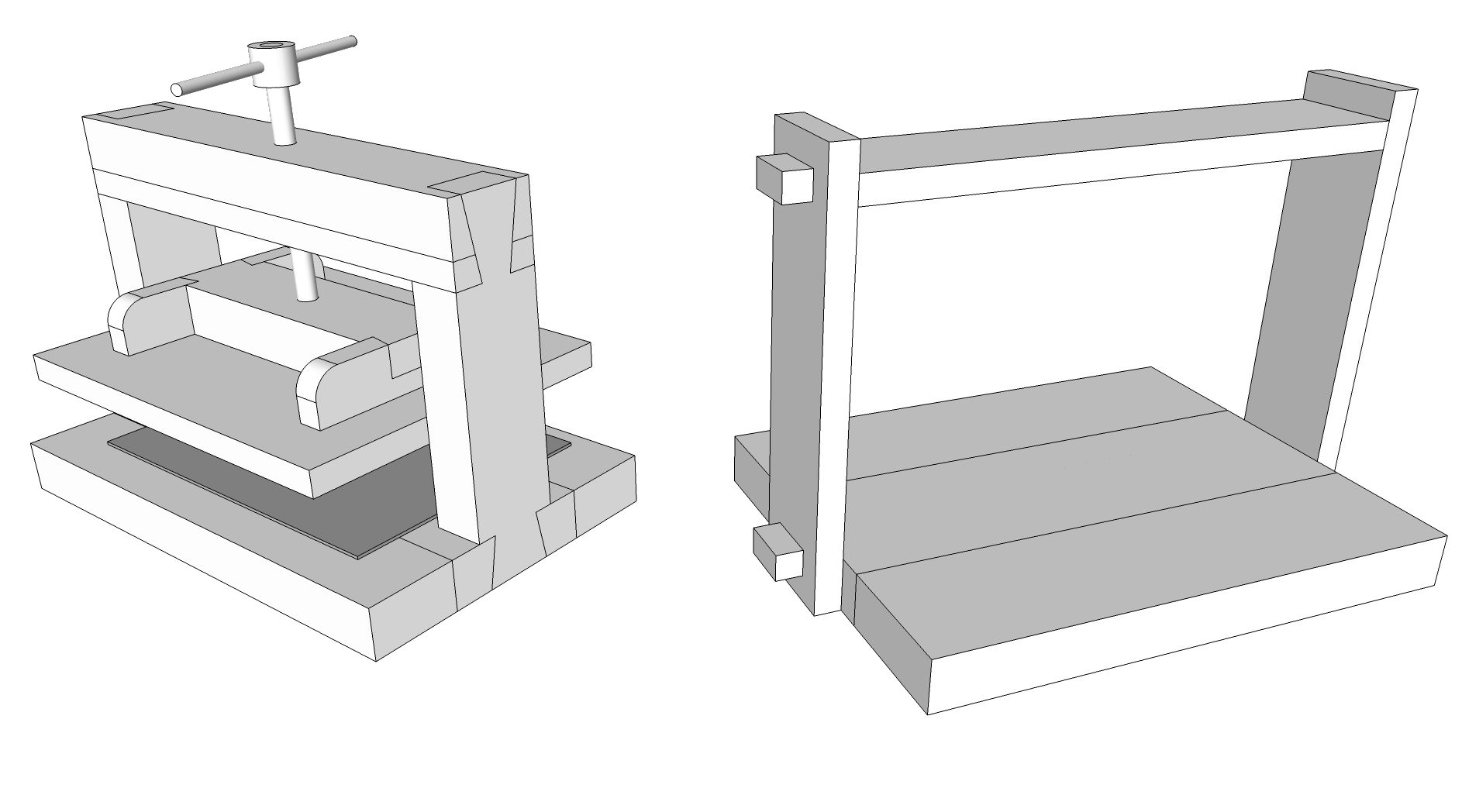
I have been wanting to make one of these babies for a while. Probably what held me back was an overly complex first design, complete with dovetail joints and everything. Also the timber I planned to use was not too square or true—I was planning on planing it by hand to square it up. Instead, I am planning on using some timber I bought a while ago which is square: some lovely Blackbutt.

The Joints, or, Simple but Strong

I am going to join the 3 base pieces by edge-gluing them together, then clamping, after cutting out the tenons on my table saw. Then I will, after cutting the mortices by hand, drill a hole in the tenons, and after assembly, wedge wooden pins in said holes. This will keep the joints together, and allow for a bit of flexibility in that I will be able to knock the pins out and take the thing apart for flat-packing (thanks IKEA).

I originally wanted to use dovetails (as can be seen in the image above left) for the joints, for their strength and beauty. But I think that wedged mortice-and-tenons will work just as well, and will be much easier to make.

The Platen and Screw

The platen for my simple press will be simple: probably made from MDF with some Blackbutt strengtheners. I didn’t put it into the new SketchUp because I was lazy. I bought one of these shoulder vises from Carbatec, and I am going to use that for the press. I am thinking of repainting the cast bits in black.

A Simple Finishing Press and Plough

Side of the Press

…Finally!

I had wanted to make a finishing (lying) press for ages. In my dreams I was going to buy on of these wood thread tools, some dowels, and make some wooden screws. Because they are just so cool and I love the creaking sound you get when you turn them. That was a long time ago. I didn’t ever get around to it.

Then, the other weekend, I decided after a flash of inspiration to just make a very simple version with some long bolts with wing-nuts for ease of tightening. I never wanted to make one like this, because I wanted the beautiful wooden screws mentioned above. I also tend to have very grand ideas that I have to think about for ages and that are too hard for me to accomplish, thus they never get done!

To make the press, I cut two cheeks on the table saw out of 25mm MDF (while wearing an old pair of pyjama pants as a dust mask—MDF dust is bad to breathe in). Next I drilled holes through both cheeks, and finally made the holes on one cheek bigger for ease of movement over the threads. All I had to do was thread the bolts through the holes and tighten them until the square bit under the cup-head sank a bit into the MDF.

Plan View of Lying PressPloughing in Progress

Chisels into Ploughshares

Part of the reason that I made this was because I wanted to use one of my chisels as a sort of plough for finishing off the head, tail, and fore-edge of some books I was working on for Christmas gifts. After making the press as described above, I gave one of my chisels a sharpen and a strop on leather, then set about testing the setup. It worked very well, but with some possible areas of improvement. In thicker books, I found that standing with the press perpendicular to me and using a pulling motion on the chisel was much easier and safer than trying to push it through left-to-right or right-to-left.

The Result III (Fanned Edge)
The Result IIThe Result I

Improvements

After using the press and chisel–plough to finish the edges of some small books I was making for some christmas presents, there were some things I wanted to improve. I  got longer bolts so that I could make the press cheeks thicker, which I’ve done by adding on another bit of MDF to each side, doubling each cheek’s thickness. The 25mm by itself tends to bend under a lot of pressure, and also is not quite wide enough for the chisel to rest firmly and securely—on 50mm the chisel is much more stable, and doesn’t bend as much.

I also want to build a better plough, more like the traditional bookbinding plough. I have found that the results from the chisel are OK, but it tends to leave lines in the paper, where I might have moved the chisel slightly up or down between passes. I want to make a blade from some old hacksaw blades too—one that can be used pushing and pulling.

Ana’s Book

Ana’s Book Front Cover

Recently I made a little book for a friend’s 30th birthday. It is a little hard-cover number, with standard 80gsm laser printer paper. It has some lovely Chiyogami endpapers and is covered in dark blue Momigami paper. I embossed the words ‘Ana’s Book’ on the front and back cover respectively. The spine is covered in some type of book cloth—I am not sure which—but it is pretty sturdy and looks much the same on both sides.
Ana’s Book Front Cover DetailAna’s Book Back Cover IIAna’s Book Back Cover IAna’s Book Endpapers

The Process

Making the Text Block

The pages of the single section are first folded, and two decorative endpapers are then folded so that they are facing each other (the printed side inwards) and put with the text block. A smallish piece of calico is cut to wrap around the outside of the text block—about 3–4 cm away from the spine is enough, and about 5mm from the head and tail. The calico gives the whole thing some strength. The sewing holes are carefully marked and punched, and the text block is then stitched together. I used a 5-hole pamphlet stitch, with the knot hidden in the spine (if you make it small enough, the knot won’t be visible on the outside of the spine when the book is finished). That means that you start sewing from the outside. I used some raw-coloured 1-ply linen thread, which I waxed with bees’ wax.

The text block was trimmed on a guillotine, head and tail, to fit into the covers with a 3mm square (that’s the bit of the covers that extends past the book block). I left the text a little long before sewing, and trimmed it afterwards.

Making the Covers

The boards for the covers were pre-cut (I made the book to fit some board I already had), so all I had to do was sand the head, tail, and fore-edge, and round the corners a little. For the lettering, I first sketched what I wanted on a separate bit of paper, then transferred it to some thinnish board. I then carefully cut them out with a sharp hobby knife. Some of the smaller curves are hard to get looking nice with just the knife, so I sanded the edges a little with sandpaper. Once I was happy with how they looked, I glued them to the covers with a little PVA and left them to dry.

The next job was to prepare the book cloth for the spine, and the Momigami for the covers. I measured and marked on the book cloth the height of the covers plus 15mm head and tail. I made it wide enough to wrap around the book and then 25mm or so onto the covers. I cut the book cloth making sure it was nice and square. With the Momigami, I just roughly cut two pieces to size, after which I marked the outline of the covers, allowing 15mm for folding over. I made it wide enough to overlap the book cloth by about 3–4mm.

To glue the book cloth, I placed the text in between the covers, protruding out the back about 7mm. I put this front-cover-down on the bench, and put a weight on it. After applying PVA to the spine strip, I applied it to the cover, up to the line I had marked previously. I then carefully turned the whole thing around and weighted it again, making sure I didn’t disturb anything. Next, the book cloth was wrapped around and glued to the front cover, up to the line I had marked. The cover was then taken away from the text block and the head and tail folded over and pressed in with my bonefolder, making sure that the cloth was stuck to the edges of the board. Next, wheat paste was applied to the Momigami and it was carefully applied to the front, then carefully pressed into the little nooks and crannies of the lettering. The same was done for the back. It was left to dry overnight.

Casing-in

The next evening, I prepared to case-in the book (paste the text block into the covers, also called a ‘case’ I think). I started by gathering the tools and supplies I’d need: paste brush, damp cloth, plastic sheet to protect work surface, scrap glossy paper, paste, and a small jar of water. I positioned the text into the case, and placed it onto the bench. I carefully opened the cover and slipped a sheet of the glossy paper in between the endpapers and applied paste. When doing so, I made sure that I got enough paste under the calico, and on top of it, and the rest of the endpaper. I then carefully closed the cover and pressed down a little, after first taking out the sheet of glossy paper. The same process was applied to the other cover. I then left the book under a stack of heavy computer programming books, some book board, and a container of lead shot (which I use to make paper weights) for the night.

The Result

On inspecting the book the next morning, I was dismayed to find that the end papers had stuck together. I carefully pulled them apart—luckily there was no ripping or anything. They were stuck a little more firmly there the calico was, but this came undone with a little careful manipulation. I will not forget to put some wax paper between the endpapers again! I also discovered that I put just a little too much paste on the endpapers, as it had leaked out and stuck a couple of pages together. Luckily, they came undone with only slight tearing.

Overall, I was immensely happy with the outcome; the book felt really good in the hand, and opened and shut really well. The embossed text looked awesome, and I was happy with the colour combinations.

Ana loved her gift, and I can’t wait to make another one! I only wish I remembered to take some better photos.

Module 11: C’est la Fin!

Domestique

On Digital Blooming

I can’t answer the question about Bloom’s Taxonomy because I haven’t used it since uni days. However, I believe that the mentioned tools (Flickr, Second Life, and Mind Mapping) could fit into the ‘Applying’ key term, because these things are all about doing something, which is what Applying is all about.

On Classroom 2.0

I have really enjoyed this course. I learnt many new things, and got a Twitter account. I use it to post my favourite words; I am trying to post 1 a day, but it’s not working that well so far. Not that I want to pressure myself.

I am pretty pumped to try out some wikis for some of my classes, maybe even the whole year 8 group. I think it would make an excellent assessment task. And I am sure that the students would love to get something they’ve created on the Interweb.

I also would like to give Prezi a go in the classroom. Particularly with some of the more adventurous kids. I think that there is a lot more room for freedom and creativity than with something like the ubiquitous and cumbersomely-named Microsoft Office Powerpoint or I have to say it, Apple’s Keynote (even though it is really cool, and heaps better than Powerpoint).

Delicious is one too that I think will be useful in the classroom, especially as a way of speeding up searches for information.

So it’s farewell to the Web 2.0 course. I will keep blogging (since I paid for a domain name).

Module 10: Ningin’ Wikis

The World in Shades of Grey

On Collaboratively-Creating Communities

I really like the idea of creating a locally-hosted community-based website for a specific purpose, such as for school community development, or for a club or something. I have no idea why they are called ‘Nings’. I can see that a lot of what has been part of this course (Twitter, blogging, prezi, etc.) could be made more useful and easier to access with such a site. Site members could have their twitter stream automatically updated on their page, and teachers could have their twitter stream automatically updated on everyone’s. That being said, if the school had a learning management system such as Moodle running, a ning would possibly not be needed.

I also like the idea of creating a wiki as a class. This could be done as a class assignment, or a smaller group assignment if the class was bigger than about 3 or 4. I think I see the most potential with wikis out of all the various technologies experienced so far in this course. I like the idea of trying this in a Geography class, where individual pages could be created for keywords in specific topic. Each page would have to have the key term, a definition, an explanation, examples, and images. I can see the students really being involved in this, especially if their work is visible on the Internet. This is something I will try with my Geography class.

I will have to check out some of the wiki sites and see what they offer in terms of content moderation etc. I think that I would have to approve each page before it went live. I would also like to know if there is an open-source wiki package that can be hosted locally, or on our own website. That might be interesting too, and could be used as a development platform (for the local) and for a live site.

Interesting.

Module 9: Social Networks and Second Life

The Stamen—Look At All The Stamen

On e-Life

At first while I was watching the videos about using 2nd Life a an educational tool, I was a bit worried. My initial fear was that young people are not getting taught the social skills they need; and I mean face-to-face social skills. I think there could be some fun things done with 2nd Life, but as long as it wasn’t everything.

I initially couldn’t really see what great benefit Twitter would have in the classroom, even after getting my own account. I thought It could only be used as a fun activity, but I can’t see myself using it to hand out homework (my school has no homework anyway) or whatever. After a bit of further exploration and trying to pry my mind open with a crowbar, I think that it could have some useful applications. I like some of the suggestions in the presentation linked to from the Module 9 page. Some of them are:

  • 5: Collate classroom views
  • 6: Let parents see what you are up to
  • 8: Short but Sweet
  • 15 Word play
  • 22 Scavenger hunt
  • 23: Track with Twitter
  • 24: Teach bite-sized information

So there you go. I might try some of those things in my class. You never know.

Unfortunately I was unable to get access to Scootle at the time of writing this blog post. I look forward to checking it out in the future though.

On Communication

Something that has come up for me while writing this post is the issue of communication particularly in its traditional forms. I think it is of vital importance that we teach our young people how to communicate in these ways. 90-something percent of communication between two people face-to-face (or over a video link I suppose) is non-verbal: communication is achieved mostly through body language. Body language is simply non existant on any form of e-communication. Sure, there are such things as emoticons and all-caps for shouting, but I think they can never capture the infinite subtlety and nuance that a certain tone of voice, look, or posture can. What if the whole Internet came crashing down. It won’t, but what if it did? It would be interesting to see how we would cope.

Module 8: Really Simple Syndication

Keep Climbin'

On Simplicity

When I first found out about the meaning of the abbreviation RSS—which is Really Simple Syndication—I had a little chuckle to myself. I love its humour.

I’ve been a subscriber to several design & typography related feeds for a while, and I created one for my school’s website. You can view it here. I typically consume my RSS through Mail on my Mac. I like that it is in the same place as my emails, and it makes it easier and more convenient to read them all. I did try Google reader, and I liked it, although it was a bit cluttered and overly complex for my tastes.

I like the idea of RSS: that you subscribe to something of interest to you and you automatically get new items. Pretty cool. I have found myself when I first open my computer’s lid in the morning eagerly anticipating any new RSS items to read. It’s nice to read some of the more sporadically updated ones, and it makes one feel connected to people around the world.

Yay RSS.

Module 7: Heerlijk!

Preparation

On Social Bookmarking

I have heard about sites like del.icio.us for ages. Probably since it has been around. I had a look once, and didn’t understand it, and that was that. Otherwise known as a close-minded attitude.

Doing this course in a spirit of openness and inquiry, I decided to have a look, and I got an account. I couldn’t figure out how to add someone to my network—and most of my colleagues haven’t got to module 7 yet—so I added or followed Ben Bishop’s delicious and was pleasantly surprised. Mainly because many of the bookmarks on his page I was interested in and found useful. I realised that instead of spending heaps of time searching for resources on google, I could spend heaps of time searching for resources on Delicious. I realised that I would probably find better material than looking through endless search results because someone already has and has bookmarked it. I love this idea.

I think in my previous limited encounters with Delicious I didn’t fully grasp the concept of why anyone would want to have bookmarks on a public website. The sharing aspect was totally overlooked by me. I am glad I tried it out.

Now to find some more cool bookmarks: heerlijk!